
Topic: iframe tracking, cross-origin iframe, same-origin iframe, postMessage, proxy conversions, event listener, ResizeObserver, FocusObserver
Almost every online marketer has run into this problem at some point: iframe tracking. The ad campaign is planned, the landing page looks great, and everything seems ready to go. Then you realize the booking form is actually an embedded tool, which means conversions cannot simply be measured through regular form submissions.
The frustration is justified, but the situation is not hopeless: in most cases, iframes can absolutely be tracked. Sometimes very precisely, sometimes only as an approximation. In this article, I’ll walk you through 6 ways to do it.
Common pitfalls in iframe tracking
If you’re now thinking, “Just tell me the right / best way,” I have to disappoint you: unfortunately, there is no universal best approach. Whether an iframe can be tracked, how it can be tracked, and how deep that tracking can go depends, as so often in tracking, on the individual architecture and the technology behind it:
- Is the iframe same-origin, meaning it is embedded from your own site, or cross-origin, meaning it comes from a third-party provider?
- Can you change the iframe code, or have someone change it for you? And if so, to what extent?
- How is the iframe built, and what exactly changes when a user interacts with it?
Depending on the answer, conversion measurement can range from “at least as reliable as the rest of your tracking” to “we can use proxy and soft conversions as weak signals for a completed action.”
Strictly speaking, iframes are not part of your page. They are separate pages with their own DOM and data layer. Client-side tracking usually depends on detecting DOM changes, events, or data-layer signals on the page. With cross-origin iframes, that exact access is heavily restricted. From your tag manager’s perspective, the iframe is almost like a separate tab the user visits to convert.
The options below are ordered from most complex to least complex. The best approach is usually to work through them in that order.
Same-origin iframes
If the iframe comes from your own website and is simply embedded from another subpage, direct tracking is possible. You can check whether this is the case by inspecting the HTML and verifying whether the hostname matches your own site.
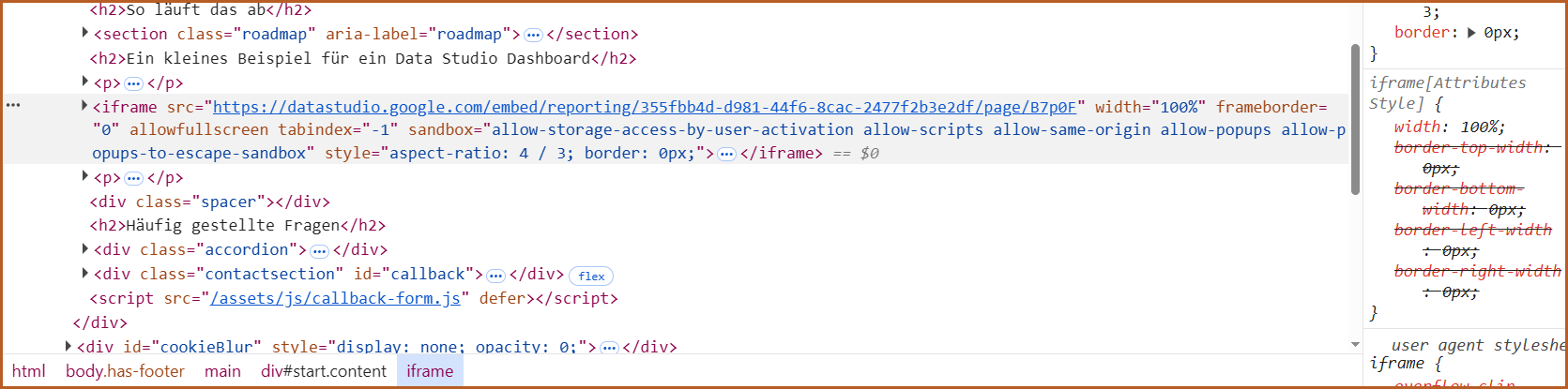
This iframe comes from Google Data Studio, so it is cross-origin
If it does, there is no reason to worry. You can set up your tracking as usual. The only thing you need to watch out for is that you do not accidentally track two page loads. Otherwise, your analytics may show duplicate pageviews and distort your reporting.
This is easy to avoid. The simplest solution is to modify the trigger for your base G-tag and exclude the iframe subpage. Apart from that, there are not many special considerations here.
Cross-origin iframes
Not all cross-origin iframes are equally difficult to track. In general, the available options fall into four different cases:
Case 1 – Well-known third-party iframes: If your conversion happens in Brevo, Calendly, or a similarly established tool, there is a good chance that clean event data is already being sent to the parent page. The easiest approach is to search for your provider’s name together with its tracking documentation. In many cases, you will find a detailed tutorial for your exact setup.
Case 2 – The provider allows you to add your GTM snippet: This case is almost as simple as working with a same-origin iframe. You can add your GTM container, and tracking works just as it would on your own page. You only need to check whether the double-pageview issue described above applies. If it does, you can fix it in the same way. With Meta and some other recipients, you also need to make sure the iframe domain is added to the list of trusted hostnames so the Event Manager accepts the events. This is not necessary for Google Analytics, however.
Case 3 – Your GTM cannot be added, but you are in contact with the developers / code changes are possible: In this case, data can be sent to the main page via postMessage and then used there for a data-layer push. For example, it could look like this. This JavaScript must be added inside the iframe, not on your page:
window.parent.postMessage({
  type: 'gtm_event',
  payload: {
    event: 'booking', // add your event name here
    // Custom parameters
    param: 'maintenance', // Custom parameters, e.g. business_unit: 'maintenance'
  }
}, 'https://yoursite.com'); // used only for verification
In your tag manager, you can then use a short piece of JS to turn the postMessage into a custom event, for example with an event listener HTML tag in your Tag Manager:
<script>
window.dataLayer = window.dataLayer || [];

window.addEventListener('message', function (e) {
  if (e.origin !== 'https://iframe-domain.com') return;        // Check sender
  if (!e.data || e.data.type !== 'gtm_event' || !e.data.payload) return; // Check structure

  window.dataLayer.push({
    event: e.data.payload.event, // this triggers a custom event named 'booking'
    // Custom parameters
    param: e.data.payload.param, // this adds the existing event parameters
  });
});
</script>
After that, all you need is a trigger that fires on the custom event:
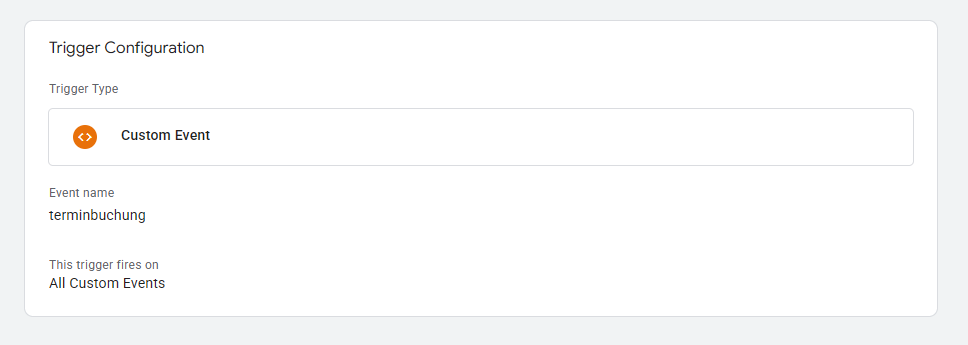
Case 4 – If none of the first three options applies: If none of these three cases is possible, this is where clean hard-conversion tracking reaches its limit. The final option is to set up proxy conversions that at least measure deeper interaction with the iframe, even though they cannot verify exactly what happened inside it. This is not ideal, but for Google Ads, for example, it can still be a useful signal for the algorithm to work with.
Proxy conversions with iframes
At this point, it is worth taking a closer look at the iframe: What happens when someone completes the process? Does the iframe change? If so, how?
One best-case scenario, for example, is that the iframe changes size as users move between screens. At first, the iframe may show a large calendar and several input fields, but on the confirmation page, it shrinks to a fraction of its original height.
If that change does not only happen inside the iframe but is also reflected in the size of the embedded element itself, it can be monitored with an event listener:
<script>
(function() {
  var iframe = document.getElementById('[ID of iframe]'); // Add the ID of your iframe here. Alternatively, you could use a CSS class with querySelector, for example

  if (!iframe) return;

  var lastHeight = iframe.getBoundingClientRect().height;

  function checkHeight() {
    var currentHeight = iframe.getBoundingClientRect().height;

    if (currentHeight < lastHeight - 1) {
      window.dataLayer = window.dataLayer || [];
      window.dataLayer.push({
        event: 'booking', // add your event name here
        // Custom parameters
        param: 'maintenance', // Custom parameters, e.g. business_unit: 'maintenance'
      });
    }

    lastHeight = currentHeight;
  }

  if (typeof ResizeObserver !== 'undefined') {
    new ResizeObserver(checkHeight).observe(iframe);
  } else {
    setInterval(checkHeight, 500);
  }
})();
</script>
Similar to a resize event, this mechanism works for any changes that happen on the parent page. If a click inside the iframe causes the page to blur or disables scrolling, you can write a very similar event listener for that behavior.
Note: In Google Tag Manager, it is important to consider how and when these changes happen. For example, if the iframe size changes multiple times, or if users can return to a previous step, you need to make sure your tag only fires once so you do not distort your data.
When all else fails
If nothing on your page changes when someone interacts with the iframe, there is one final option. To be clear: it is a very weak signal and barely works on smartphones. So if it is possible to target your campaign to desktop devices, I would recommend doing that.
In effect, this approach tracks when the mouse leaves the parent page and the iframe receives focus:
<script>
(function() {
  var iframe = document.getElementById('[ID of iframe]'); // Add the ID of your iframe here. Alternatively, you could use a CSS class with querySelector, for example

  if (!iframe) return;

  window.addEventListener('blur', function() {
    setTimeout(function() {
      if (document.activeElement === iframe && !document.hasFocus()) {
        window.dataLayer = window.dataLayer || [];
        window.dataLayer.push({
          event: 'booking', // add your event name here
          // Custom parameters
          param: 'maintenance', // Custom parameters, e.g. business_unit: 'maintenance'
        });
      }
    }, 0);
  });
})();
</script>
One small caveat: Whether the iframe is actually registered as the document.activeElement when clicked depends on the browser and is not guaranteed. That is exactly why this is a weak signal, not a reliable conversion trigger. So do not rely on it blindly. Treat it as what it is: an indication, not proof.
This at least allows you, to some degree, to identify users who are more likely to have completed the action than users for whom this event did not occur.
Problem solved?
As you can see, iframe tracking is rarely black and white, but there is almost always a workable path. From clean hard conversions with same-origin embeds to postMessage and data-layer pushes, all the way to proxy signals as a last resort. With a little patience, a usable solution can be found for most setups.
The important thing is to be honest about how meaningful your signal really is. A reliable conversion is extremely valuable. A weak proxy signal is still better than no data at all… as long as you treat it accordingly and interpret your reports with the right level of caution.
And if you are not sure which signal is reliable in your setup, or if you would rather put the entire tracking setup in experienced hands: just get in touch. You can request a non-binding callback using the form below or contact me directly. Together, we will find a solution for your iframe as well.
Or would you prefer email?
I usually get back to you within the next few hours. If you'd like, you can go ahead and explain what this is about and leave me a link to your website.