
Topics: Cookieless Tracking, Cross-Domain iFrame Tracking, Privacy Compliance, client_id/session_id, Measurement Protocol Endpoint, Case Study
Admittedly, cookieless tracking is still more the exception than the rule in day-to-day analytics. Most setups rely (at least partially) on cookies, e.g. to identify users or measure across sessions. Still, there are situations where exactly this approach is not desired... or even impossible:
Especially in privacy-sensitive industries or generally in GDPR contexts, there’s very often a desire to reduce data collection (and therefore legal exposure) to a minimum and/or get by without a cookie banner. In many cases, such requirements can be addressed with a privacy-first tool like Matomo or via a server-side tracking setup.
But: that doesn’t always work, or the effort simply isn’t justifiable. Exactly such a case came up with one of my clients, who wanted to embed a small tool as an interactive iframe on a partner website. Of course the campaign’s success had to be measured to evaluate effectiveness. Sounds simple? Unfortunately not.
Cross-domain setups & cookies
A regular implementation of Google Tag Manager and GA4 isn’t possible in such a case due to cross-domain restrictions. Modern browsers and many websites prevent cookies from being set in such scenarios, depending on configuration. Even an otherwise “harmless” first-party cookie becomes a third-party cookie in this setup, because it’s written by the iframe’s origin domain. That means GA4 is missing a fundamental prerequisite for initialization.
The roadblock was perfect: introducing a new analytics tool or setting up server-side tracking for a time-limited campaign would clearly be disproportionate. That quickly leads to the question: “Is client-side tracking with GA4 possible without cookies?” And the answer is: yes, at least if you can live with a few limitations and a couple of “hacky” workarounds.
GA4 doesn’t (actually) need cookies
A “normal” GA4 setup via Tag Manager is usually very straightforward: embed the GTM snippet, create a GA4 tag in the GTM container, and then define the desired event structure. The browser library takes it from there, sets the necessary cookies, and automatically sends the collected data to Google Analytics.
In the described iframe scenario, however, this flow breaks right at the start. GA4 doesn’t initialize correctly, so no data is sent to GA4 at all. The reason is a missing prerequisite. The gtag fails if core values like the client_id aren’t available. Those values are normally read from a cookie. And that cookie can’t be written in this case.
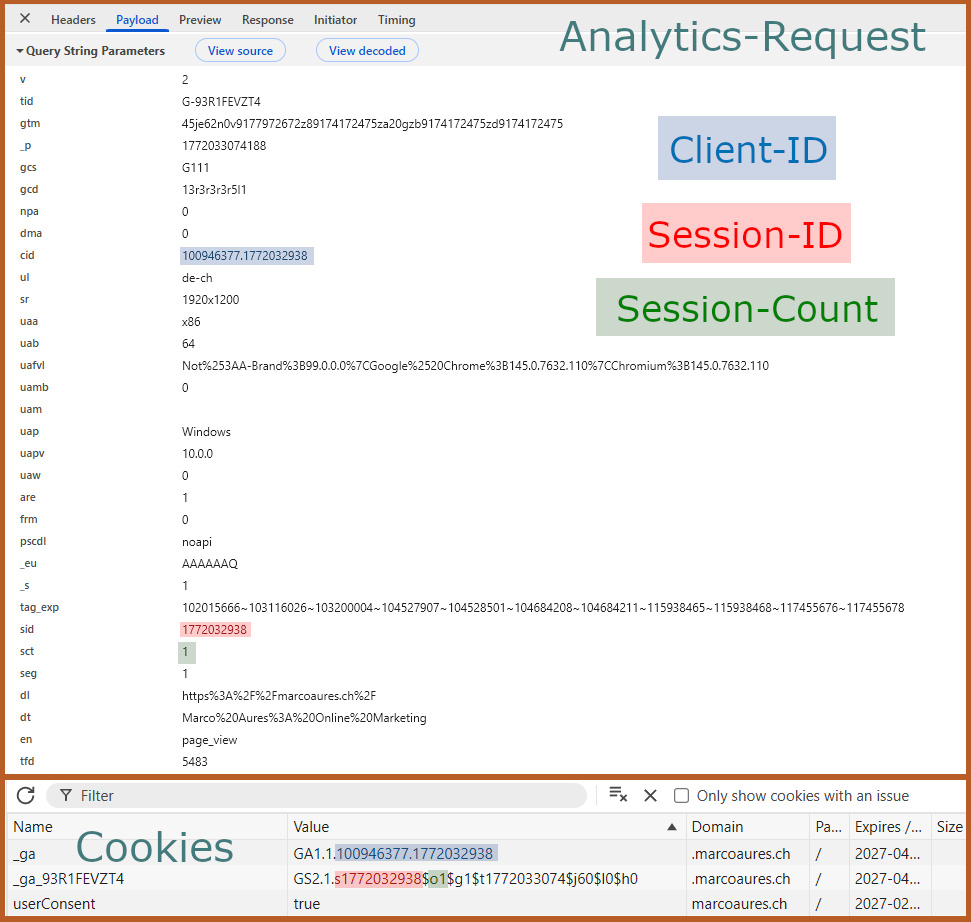
Comparison: Analytics request & cookie data
At first glance, you might think client-side GA4 tracking without cookies is impossible given all of the above. That’s not entirely correct: GA4 actually doesn’t really require cookies, only the IDs that typically come from cookies. If you can generate and transmit these IDs by other means, you can send events to GA4 without setting any cookie.
Note: “Cookieless” does not automatically mean anonymous. Even without cookies, personal data or data that can be linked to a person may be processed when sending to GA4. Depending on the legal context, requirements for transparency, privacy policy disclosures, or consent may still apply. In this project, this was addressed in line with the revised Swiss FADP via a disclaimer inside the iframe.
Sending analytics data directly to the endpoint
The solution for my client looked like this: We send GA4 events via Measurement Protocol directly to /g/collect, generate ephemeral pseudo session and client IDs, and control everything via Tag Manager. In other words: we manually do what the gtag.js library normally does. Just without a cookie.
If you’ve worked with server-side tagging (SST), you might instinctively go for the Measurement Protocol endpoint /mp/collect, which is typically intended for server-side tracking or offline conversions. For a purely client-side setup, however, this path comes with hurdles, not least the requirement to expose an api_secret in the frontend.
We obviously didn’t want to leak API keys, which immediately ruled that method out. That’s why we chose the web endpoint /g/collect, which is also used by the standard web library and can be called directly from the browser without additional authentication.
GA4 base tag & events without gtag.js
Because neither a classic GA4 tag nor the gtag.js library can be used in this setup, all required events had to be built and sent manually. How much effort that is depends on how many events you want to implement.
For basic events like first_visit, session_start, and page_view, we defined a shared tag that fires on DOM Ready. Inside that script, we assembled the necessary parameters: Measurement ID, pseudo client_id, pseudo session_id, language, and additional metadata like URL, referrer, or page title. The script essentially replicates what gtag.js normally does in the background: build the request URL and send tracking data via sendBeacon (or alternatively fetch) to Google Analytics.
<script>
  (function() {
    var measurementId = '{{Mess-ID}}'; // GA4 Measurement ID (e.g. « G-A1BCDEF234 »)
    var clientId = '{{ga4_pseudo_cid}}'; // Pseudo client ID (unique value) – more on this later
    var sid = '{{ga4_pseudo_sid}}'; // Pseudo session ID (unique value) – more on this later
    var lang = '{{language}}'; // User language (here taken from URL query parameter)

    var sct = 1; // Session count is hardcoded as 1 because no real multi-session counting is possible

      // session_start event:
    var sessionStartURL = 'https://www.google-analytics.com/g/collect?v=2' +
      '&tid=' + encodeURIComponent(measurementId) +
      '&cid=' + encodeURIComponent(clientId) +
      '&sid=' + encodeURIComponent(sid) +
      '&ul=' + encodeURIComponent(lang) +
      '&sct=' + encodeURIComponent(sct) +
      '&en=session_start'; // en = event name.
      // String concatenation builds the query parameters for the GA4 /g/collect endpoint

    if (navigator.sendBeacon) {
      navigator.sendBeacon(sessionStartURL);
    } else {
      fetch(sessionStartURL, {method:'POST', keepalive:true, mode:'no-cors'});
    }

      // first_visit event:
    var sessionStartURL = 'https://www.google-analytics.com/g/collect?v=2' +
      '&tid=' + encodeURIComponent(measurementId) +
      '&cid=' + encodeURIComponent(clientId) +
      '&sid=' + encodeURIComponent(sid) +
      '&ul=' + encodeURIComponent(lang) +
      '&sct=' + encodeURIComponent(sct) +
      '&en=first_visit'; // en = event name.

    if (navigator.sendBeacon) {
      navigator.sendBeacon(sessionStartURL);
    } else {
      fetch(sessionStartURL, {method:'POST', keepalive:true, mode:'no-cors'});
    }

      // page_view event:
    var pageViewURL = 'https://www.google-analytics.com/g/collect?v=2' +
      '&tid=' + encodeURIComponent(measurementId) +
      '&cid=' + encodeURIComponent(clientId) +
      '&sid=' + encodeURIComponent(sid) +
      '&sct=' + encodeURIComponent(sct) +
      '&en=page_view' +
      '&dl=' + encodeURIComponent(location.href) + // dl = document location: URL
      '&dr=' + encodeURIComponent(document.referrer) + // dr = referrer
      '&ul=' + encodeURIComponent(lang) +
      '&dt=' + encodeURIComponent('{{document_title}}'); // dt = document title: page title

    if (navigator.sendBeacon) {
      navigator.sendBeacon(pageViewURL);
    } else {
      fetch(pageViewURL, {method:'POST', keepalive:true, mode:'no-cors'});
    }
  })();
</script>
Because my client’s iframe was implemented as a single-page application, these events could be sent as one shared tag since no classic reloads occur in that architecture. In some scenarios (e.g. multiple virtual page changes), it can make sense to split these events and control them via separate triggers.
In addition to the base tracking, we also implemented a user_engagement event. For my client, it wasn’t only relevant how often the banner was displayed (unlike a “real” page, loading alone doesn’t guarantee the user actually saw the banner), but especially whether users actively interact with it. That’s why the implementation differs from the “GA4 standard”: while GA4 typically also triggers user_engagement automatically after a certain session duration (which can be replicated in GTM via a timer trigger if desired), in our case we wanted to measure only a deliberate interaction point. Accordingly, the event was controlled via a click trigger inside the iframe. Additionally, our script sends an approximate engagement time since the initial load of the application in this event.
<script>
(function() {
var tid = '{{Mess-ID}}';
var cid = '{{ga4_pseudo_cid}}';
var sid = '{{ga4_pseudo_sid}}';
var lang = '{{language}}';
var sct = 1;

// Engagement time in milliseconds since page/SPA start (approximation of active usage time)
var engagedMs = Math.max(0, Math.round(performance.now()));

// user_engagement event sent to GA4 /g/collect endpoint
var url = 'https://www.google-analytics.com/g/collect?v=2' +
'&tid=' + encodeURIComponent(tid) +
'&cid=' + encodeURIComponent(cid) +
'&sid=' + encodeURIComponent(sid) +
'&sct=' + encodeURIComponent(sct) +
'&ul=' + encodeURIComponent(lang) +
'&en=user_engagement' + // GA4 standard event for engagement measurement
'&epn.engagement_time_msec=' + engagedMs; // Engagement duration

if (navigator.sendBeacon) {
navigator.sendBeacon(url);
} else {
fetch(url, { method: 'POST', keepalive: true, mode: 'no-cors' });
}
})();
</script>
Custom events via HTML tag
We could use the same mechanism for additional custom events — and with this approach there are no significant limitations worth mentioning. As an illustrative example, I’m using outgoing link clicks: a click trigger in GTM fires a custom HTML tag that sends an event with a freely definable name (here: linkclick_outgoing) and an event parameter containing the destination URL to GA4.
<script>
(function() {
  var measurementId = '{{Mess-ID}}';
  var clientId = '{{ga4_pseudo_cid}}';
  var sid = '{{ga4_pseudo_sid}}';
  var lang = '{{language}}';
  var sct = 1;
  var linkUrl = '{{Click URL}}';

  var url = 'https://www.google-analytics.com/g/collect?v=2' +
    '&tid=' + encodeURIComponent(measurementId) +
    '&cid=' + encodeURIComponent(clientId) +
    '&sid=' + encodeURIComponent(sid) +
    '&ul=' + encodeURIComponent(lang) +
    '&sct=' + encodeURIComponent(sct) +
// Custom event parameter
    '&en=linkclick_outgoing' + // Event name = linkclick_outgoing
    '&ep.link_url=' + encodeURIComponent(linkUrl); // Event parameter (ep.) link_url

  if (navigator.sendBeacon) {
    navigator.sendBeacon(url);
  } else {
    fetch(url, {method:'POST', keepalive:true, mode:'no-cors'});
  }
})();
</script>
User-level parameters and pseudo IDs
As hinted above, the real crux of this setup lies in the identifiers for user and session. GA4 absolutely needs values to associate events with a user and a session. If client_id and session_id are missing, incoming hits may still be processed technically, but they can’t be aggregated meaningfully and won’t be displayed correctly.
For our project, we had a key advantage thanks to the technical architecture again: the iframe loaded a single-page application. Since there are no real page reloads, we could generate temporarily persistent IDs and store them in the data layer so they could be reused for all events.
For the pseudo client_id, we generated a random 128-bit ID and wrapped it in a GTM JavaScript variable (if you have a CSP, you will probably have to use one of the alternative methods mentioned below). This JS variable checks whether a value already exists in the data layer and generates a new ID if none exists. This keeps the identifier stable during the session.
function() {
var DL_KEY = 'ga4_pseudo_cid';
window.dataLayer = window.dataLayer || [];

for (var i = window.dataLayer.length - 1; i >= 0; i--) {
var e = window.dataLayer[i];
if (e && typeof e === 'object' && e[DL_KEY]) {
return e[DL_KEY];
}
}

var cid;
try {
var a = new Uint8Array(16);
(window.crypto || window.msCrypto).getRandomValues(a);
var hex = Array.from(a, function(b) {
return ('00' + b.toString(16)).slice(-2);
}).join('');
cid =
hex.slice(0, 8) + '-' +
hex.slice(8, 12) + '-' +
hex.slice(12, 16) + '-' +
hex.slice(16, 20) + '-' +
hex.slice(20, 32);
} catch (e) {
cid = 'dl-' + Math.random().toString(16).slice(2) + Date.now().toString(16);
}

window.dataLayer.push({ [DL_KEY]: cid });

return cid;
}
The requirements for this pseudo client ID are comparatively simple: it must (to a high probability at least) be unique so that sessions from different users aren’t accidentally merged. A sufficiently complex random ID more than satisfies this.
The pseudo session ID is even simpler. Because it only needs to be unique within a user, a monotonically increasing value is enough. In our case, we used a UNIX timestamp generated on the first execution of the variable and stored it in the data layer as well.
function() {
var DL_KEY = 'ga4_pseudo_sid';
window.dataLayer = window.dataLayer || [];

for (var i = window.dataLayer.length - 1; i >= 0; i--) {
var e = window.dataLayer[i];
if (e && typeof e === 'object' && e[DL_KEY]) {
return e[DL_KEY];
}
}

var sid = Math.floor(Date.now() / 1000).toString();

window.dataLayer.push({ [DL_KEY]: sid });

return sid;
}
But: not every scenario allows the convenient data-layer approach. As soon as real page navigations happen, you need to ensure the IDs remain persistent at least within the session in some way. That requires balancing data quality, technical robustness, and privacy considerations:
Options range from purely ephemeral in-memory storage to passing the values as query parameters to using sessionStorage — each with its own pros and cons. In-memory values are the least problematic from a privacy perspective, but they’re lost on every reload; sessionStorage persists for the entire browser session, but from a privacy perspective it’s quite close to setting a cookie. Which option makes sense depends on the specific use case and privacy requirements.
Caution: Only for edge cases
With a manageable amount of effort, the goal is reached: client-side GA4 tracking without cookies. BUT: Implementation is rarely the purpose of a tracking setup. And this approach has significant drawbacks that need to be kept in mind, which makes this solution relevant mostly for edge cases.
No cross-session tracking
The session count in the session_start event is intentionally static in this setup. The identifiers used are ephemeral and are generated anew on every visit. As a result, recognizing returning users is practically impossible.
For my client’s campaign, this downside was acceptable: the banner wasn’t a product that users should repeatedly visit. The key question wasn’t recognizing individual users, but rather how often interactions happen and how users behave within the funnel. In a standard website tracking setup, however, the lack of returning-user recognition can be a clear dealbreaker that makes this method unusable.
Privacy-first tools like Matomo have an advantage here because they can identify users across multiple visits. In the specific iframe scenario, however, a classic Matomo cookie wouldn’t have been writable either — meaning even that tool would have had to rely only on heuristic signals.
Tracking maintenance and additional fragility
Anyone running tracking knows: the biggest challenge often starts only after implementation. Forms get rebuilt, CSS selectors change, data-layer structures shift — and suddenly, months later, important data is missing and irretrievably lost.
In this setup, that risk multiplies. On top of the usual changes by site owners, there is an additional possible point of failure: directly sending requests to the /g/collect endpoint in an undocumented and unsupported manner. If Google changes parameters, validation logic, or request handling, tracking may break without any visible error. For that reason, this method clearly falls into the “use at your own risk” category. And if something does break, debugging is also rather painful.
But this risk was also acceptable in the described project. The banners ran only during a clearly limited campaign period, and there were processes that guaranteed analytics data would be checked regularly. But for long-term tracking setups intended to be low-maintenance, this alone disqualifies the described approach.
What’s possible
After reading about these limitations, you might wonder whether such a case study is relevant at all. In my opinion: yes. The iframe scenario — an interactive banner on a partner site that needs to be measurable — isn’t daily business, but it still shows up in practice from time to time.
That aside, the more interesting takeaway is a bit more abstract: it shows how flexible tracking setups can be. The Google product ecosystem provides lots of convenience features that work out of the box and cover most common use cases. But that doesn’t mean you’re limited to the “intended” paths. With a good understanding of the underlying mechanisms, you can model unusual constellations and implement individual requirements around privacy, flexibility, or data control.
Not all of these solutions are universal or sensible long-term, but they broaden your options. And sometimes that’s exactly the difference between “can’t be done” and “it's possible with some minor limitations.” And if you need support with a similar setup or just want a second opinion, feel free to reach out.
Or would you prefer email?
I usually get back to you within the next few hours. If you'd like, you can go ahead and explain what this is about and leave me a link to your website.