
Content: Google Analytics events, event tracking setup, GA4 setup, marketing KPIs, marketing tools
Over the past few years, I’ve helped many companies – from small businesses to large corporate groups – set up their tracking and evaluate Google Analytics events in reports. And that’s exactly why I can say with confidence: the answer to the question “what do we actually need to track?” is different for every website. At the same time, my own decision-making has become much clearer when it comes to which KPIs I really care about and which Google Analytics custom events I need to track them.
With this article, I want to shed some light on the topic. Together, we’ll answer the question of what the actual purpose of analytics events is. I’ll explain which website metrics you can derive from them and why they matter. We’ll look at whether you really need to set up conversion tracking in Google Analytics, or whether the “Events” tab is enough. And finally, I’ll share my honest view on when audits, reports and analyses are actually useful. But first...
Which Google Analytics events do you actually need to track?
These days, I follow a fairly clear process when deciding which tools and which tracking setup a website needs. That process is easy to reuse. Which is why I can give you a rough, individual first assessment right here of how your current tracking setup is doing: in the questionnaire below, you’ll see what’s already working well on your site in terms of analytics – and what’s still missing.
Welcome to the individual tracking check
On 6 (reasonably) short pages we answer the most important questions about tracking for your individual website. At the end, you will receive a complete, customized initial assessment that you can download as a PDF.
You can recognize mandatory questions by the * and if you are not sure about something, simply guess or choose the most appropriate answer. Please also note that this check cannot replace an analysis by a specialist.
PS: Don't worry, you don't have to enter your email to get the results (but you can if you want to work with me to get your analytics up and going 🙂).


What is website tracking?
Before we dive in, we should start by asking a basic question: what is website tracking actually, and why are we putting in the effort? The fact is that only a small minority of companies (in Switzerland and worldwide) generate a significant share of their revenue purely through visits to their website – that is, through page views without purchases or leads. Realistically, this mostly applies to blogs and other sites with very high traffic that monetize via banner ads. Even for online shops, a simple visit to the website is rarely the central business goal. For an online shop, that goal is usually the purchase.
On the other hand, websites today are very often directly or indirectly relevant to business success. A brick-and-mortar store that builds up a second revenue stream via e-commerce will see very clearly in the balance sheet how well the online shop is performing. Other companies regularly remind existing leads and former customers that they exist and gradually move them further down the conversion funnel. And even if neither of those scenarios applies: job seekers now search almost exclusively online, and virtually every company depends on attracting good employees.
So it shouldn’t be hard to see why it makes sense to optimize your website. And that already explains why tracking is necessary: optimization without data isn’t really optimization. Optimization without data is just trial and error based on gut feeling. And especially if you, for example, run Google Ads, things can get very expensive very fast.
Which tools do I need to analyze my website KPIs?
Good news: every tool you need to track your website performance is free. There are paid alternatives, of course, but Google’s product suite is still the undisputed market leader and fully covers all basics. If in doubt, I recommend these tools to pretty much every website owner:
- Google Search Console: to monitor your organic visibility in Google Search.
- Google Analytics 4: to analyze user behavior on your site.
- Google Tag Manager: to implement scripts, custom events, Google conversion tracking and much more.
On top of that, I’ve started encouraging all clients to also set up Bing Webmaster Tools. Microsoft’s search engine has a significantly smaller market share, but there are still specific user groups that are overrepresented there and who “bing” something every now and then.
There’s another important reason Bing has gained a lot of relevance in the last few years: AI. Bing has its own AI via Microsoft Copilot. But ChatGPT and Azure AI applications (the AI companies can use alongside Microsoft 365 and/or Azure) also currently use Bing for web results – at least for now. If you want to show up when someone asks ChatGPT “Who is the best provider for X?”, you can’t afford to ignore Bing anymore.
All of this would only be a decisive factor for me if the setup were complicated. Fortunately, it isn’t: if you’ve already set up a domain property in Google Search Console, you basically just click a single button to verify ownership in Bing using your existing Google verification. And based on my experience, Bing tends to give a small bonus to sites whose owners pay attention to the search engine.
What are events in Google Analytics?
If you’ve taken the questionnaire, you might have noticed that a fairly large part of it was about Google Analytics events (often simply called “events” in GA). Even the examples above – purchases, applications, newsletter sign-ups – are mostly custom Google Analytics events or can easily be broken down into them. Strictly speaking, everything that happens on your site – from page views and page changes (page hits) to scrolling and bounces – can be represented as events.
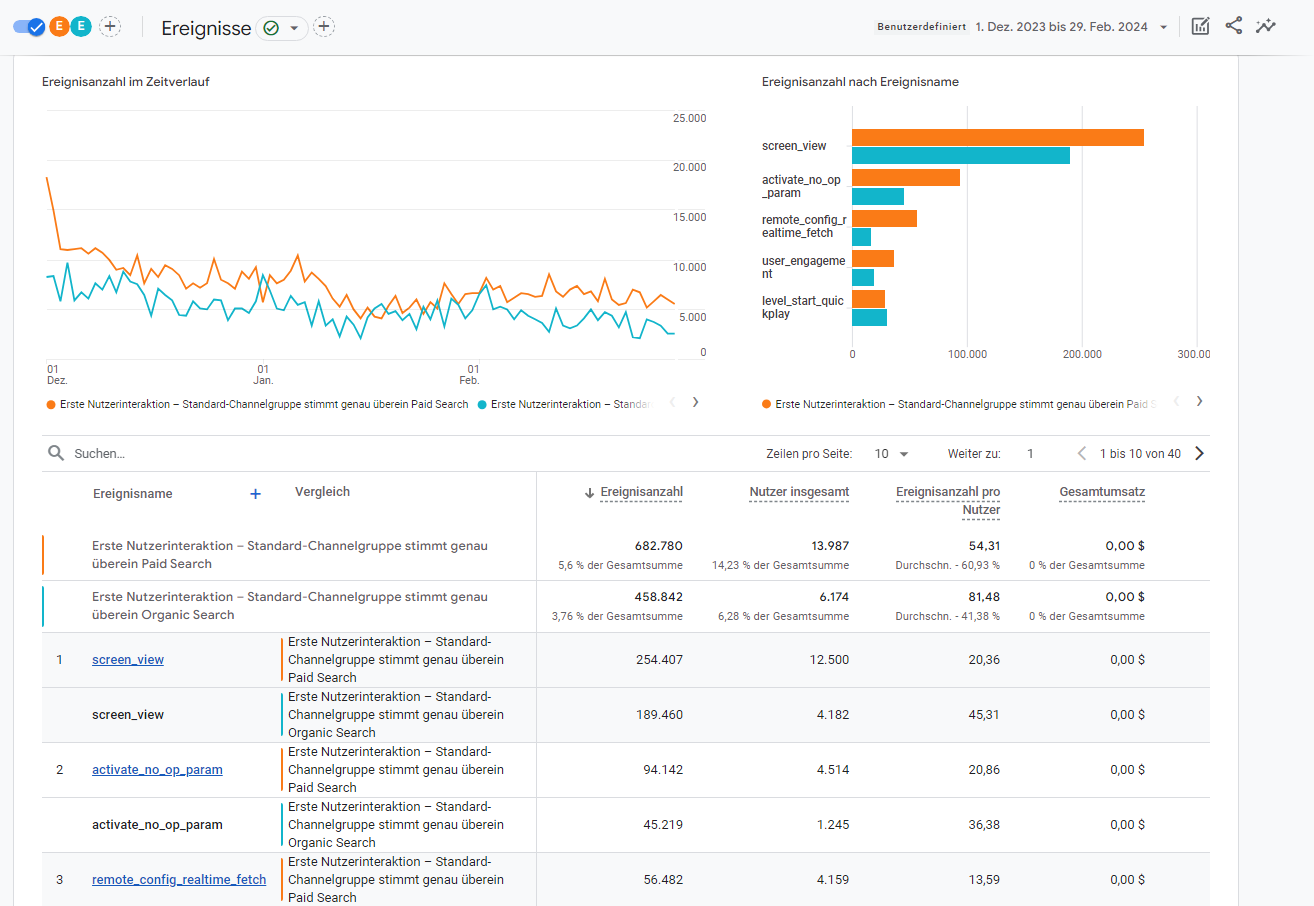
Some of these are tracked by default when you set up GA4 (page views, scrolls, etc.). Others vary so much from site to site that Google can’t detect them automatically. Those need to be created and configured manually – and the easiest way to do that is via Google Tag Manager. This extra step is often absolutely worth it.
Simple example: you’ve built a landing page for a new product. It ends with a call-to-action that opens a contact form. After a month, you’ve had 200 page views – but only 2 enquiries via the form. Why? Even without custom events, you can see that users stay on the page for almost three minutes on average.
If you’ve set up just three additional custom events, you might see that around 30 people clicked the call-to-action. The “form submitted” event confirms that only 2 people actually sent the form – so it’s not a technical error. If you also track the individual steps or page changes in the form, you might discover that users keep dropping off on the second-to-last step, perhaps because a question is confusing or off-putting.
As long as your events are genuinely relevant to business success, there are almost no limits to the insights you can get from them. If it happens on the website, you can turn most interactions into trackable events. Got a search function? Then you can quickly find out which products or subpages are hard to find. All you have to do is track search queries as an event and then analyze the search terms in Google Analytics.
Setting up Google Analytics event tracking
If you’re now wondering how to actually set this up, there are two main options: you can either configure events directly in GA4, or you can define them in Google Tag Manager and then send them to Analytics from there. My recommendation is to use Google Tag Manager for this. It gives you far more options than GA4 alone, and you get the extra benefit of being able to pass the same events to other tools – for example Google Ads or Meta Ads – as conversions.
And if you’re planning to use website interactions for remarketing, I strongly recommend setting up event tracking via GTM, because that lets you configure Google’s “Consent Mode v2” at the event level – which Google has also required in Switzerland since 31 July 2024.
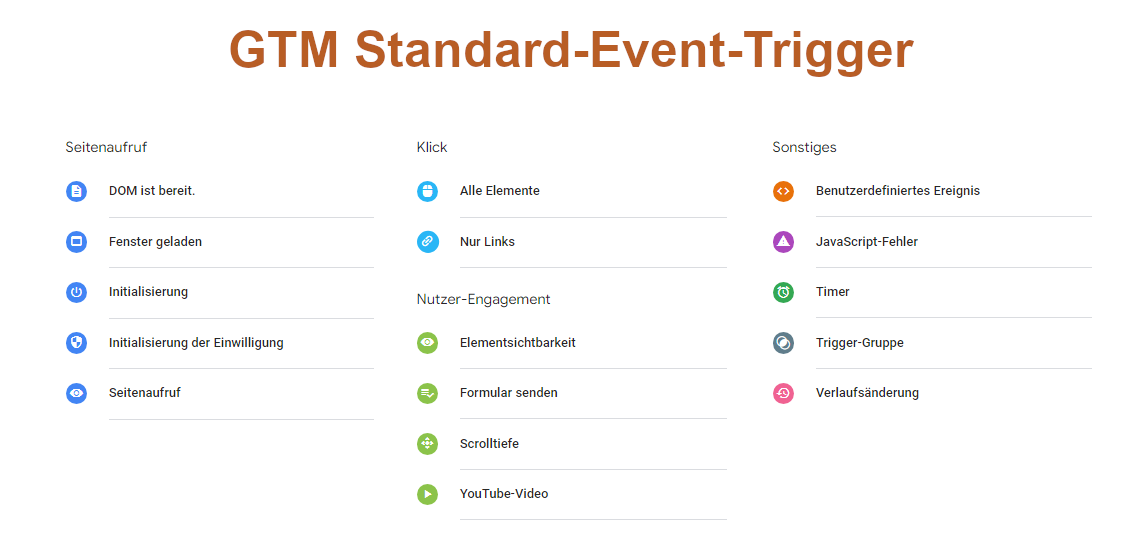
To set up Google Analytics events via Tag Manager, you can use a wide range of tag templates – including GA4 event tags – and built-in triggers that make configuration relatively straightforward. You decide when which values are sent to Google Analytics, and whether that should happen only once per page load or multiple times. Finally, you can add “parameters” as extra information to each event in GA4 – for example, which exact subpage the email click happened on.
Tip: Don’t forget that you still need to activate those parameters in GA4 under “Admin ➔ Data display ➔ Custom dimensions”. Otherwise they won’t show up in your reports, even if you’re already collecting them.
Which website KPIs should I keep an eye on?
As mentioned earlier, GA4 already tracks a number of metrics out of the box. You can see how many users come to your site and how long they stay there in the standard reports as soon as you’ve set up your property. You’ll also find the engagement rate (which used to be the “bounce rate” in Universal Analytics, but works the other way round) right in the dashboard.
But these aren’t usually the metrics you should focus on first. It’s much more useful to ask what goals your website actually has and then work backwards from there. Let’s take an e-commerce site as an example. The truly interesting user actions are purchases – and the goal is to increase revenue.
So we already know that we should track the checkout process, and that this is a key metric. If we divide completed purchases by total users, we get the website’s conversion rate. We should also pay attention to the shopping cart abandonment rate – i.e. how many people add items to their cart but never complete the purchase. If that value is unusually high, we need to ask ourselves whether the checkout process is too complicated – or whether we should use retargeting ads to bring users who abandoned their cart back and push them towards a purchase. All we need to do is track “add to cart” as an event and then divide the number of converters by the number of users who triggered that event.
Speaking of “bringing users back”: if you’re running a newsletter, you should also track all related actions, because repeat customers are a particularly valuable audience for any e-commerce store. Here, you might want to know how much your newsletter list has grown and whether it’s growing more strongly on certain subpages or from specific channels (for example users arriving from Instagram). To get those insights, you simply filter by the relevant event or parameters.
Do I really need to set up Google Analytics conversions?
A very common question is how Google Analytics conversions, Google Ads conversions and Google Analytics events differ from each other. The distinction between Ads conversions and GA4 conversions has caused a lot of confusion – so much so that Google has started renaming GA4 conversions as “key events”. That makes sense, because those two metrics are actually completely separate:
- Google Analytics key events (often also called conversions or key events): these are particularly important events that you mark in GA4 so they stand out and appear in special reports. That makes it easier to analyze enquiries, transactions or other highly business-relevant interactions in detail.
- Google Ads conversions: these are events defined separately in Google Ads. They’re the actions Google Ads monitors as your campaign “goals” and uses to optimize bidding and delivery.
The difference between “conversions”/key events and regular events in GA4 is more subtle. Key events are simply a subset of events that you, as the property owner, have marked as particularly important. Which events count as key events – and thus as “Analytics conversions” – is completely up to you and depends on the business. It will differ from account to account and from property to property.
In any case, I recommend that every website owner at least mark their important events as key events. From that point on, it only takes one click to see that you might have great SEO – but the users you acquire that way never convert. In that case, it might make sense to “pre-announce” your conversion goal in the meta title or description.
When does a Google Analytics report actually make sense?
None of these events, conversions and metrics should be collected just for the sake of it. A perfect tracking setup without any monitoring is about as useful as no tracking at all. So how, and how often, should you analyze the data? That also depends on your company and your specific website. As a rule of thumb: the more traffic you have, the more often you should check your tools. Many companies benefit from having a more in-depth website report created on top of regular checks. How often that makes sense depends on the size and traffic of the site – for many businesses, a quarterly or annual report is a good starting point.
These reports should always be created by someone with expertise, even if they’re in-house. You’re taking a big step back and looking at the bigger picture: are some areas or funnels on my site simply not working? How are acquisition channels changing – and should I be shifting my marketing focus? That takes experience and a bit of intuition. But very often, you gain insights that can fundamentally influence the long-term strategy for your website and online marketing. It’s more common than you’d think for a company to “outgrow” a website that was built 10 years ago. And an honest, data-based report is usually the perfect place to realize that.
Everything clear so far?
Whether you’re just curious, already know you want a Google Analytics report, or need help setting up your event tracking – I’m happy to help. If you like, send me an email, request a callback or use the tracking questionnaire to submit an inquiry. I’m looking forward to hearing from you.
Or would you prefer email?
I usually get back to you within the next few hours. If you'd like, you can go ahead and explain what this is about and leave me a link to your website.