
Content: SEO best practices, SEO basics, on-page SEO, technical SEO, keyword research
Honestly, I understand why SEO feels like a sealed black box for many SMEs. For every question you might have, you’ll find about 20 articles that are at best outdated and often contradict each other.
“Wait, does my keyword need to be in the meta description or not?” “What are these cornerstone pieces everyone keeps talking about?” “Okay, apparently backlinks are important. And how on earth am I supposed to get them?”
On top of day-to-day work, finding the time, patience, and energy for this is anything but a given. This post is my attempt to shed a bit of light on the topic. 5 simple SEO tips that SMEs and beginners can actually apply and a few SEO basics for beginners.
SEO Tip 1: Do keyword research
The most common mistake I see when optimizing websites for clients is actually very fundamental. Very few sites use the right keywords, and often no keyword research has been done at all. The result: even high-quality content doesn’t rank well.
So, keyword research – what is it? Put simply, it’s the process of finding suitable search queries you want to rank for on Google. Sure, we’d all love to rank #1 for “running shoes”, “software developer”, or “pizzeria”. Whether the effort required is actually worth it is another question entirely:
These very short “short-tail keywords” are searched for extremely often, but they’re also extremely competitive. Especially from a cost–benefit perspective, I often recommend that my clients focus on so-called “long-tail keywords” consisting of several words. “Best pizza in Bern” probably isn’t searched 12,000 times per day, but 50 searches per day where you show up in positions 1–3 will bring far more users to your site than ranking on page 17 for “pizzeria” (I explain why here).
And finding such keywords isn’t actually that hard. The easiest way is with keyword tools like Semrush or Ubersuggest, but even without paid tools it’s possible. Google Ads offers the Keyword Planner, which shows how often a term is searched on average, how many companies are advertising on it, and how the keyword is trending.

Don’t worry, you don’t have to actually run ads to use keyword research. The Keyword Planner is just a tool to find (long-tail) keywords with a relatively high search volume and as little ad competition as possible. With a list of the top 20–30 keywords, you can then check which pages currently rank at the top of the search results and see whether you can compete with them.
My recommendation: Before you write any content, find the right keywords for your business. Ideally, look for long-tail keywords with high search volume and low competition.
SEO Tip 2: Follow a few key guidelines when creating content
Just having keywords, of course, isn’t enough. To make them useful, you need to actually use them in your content. And there are a few SEO tips and tricks you should keep in mind.
First of all: “More is better” is not a good tactic. Google calls this “keyword stuffing” and, in the worst case, will penalize it. It’s more helpful to aim for a rough keyword density: 3% – meaning you should use the keyword about 3 times per 100 words – is a good rule of thumb.
The term “rule of thumb” is very deliberate here, because search engine algorithms have long moved beyond such simple metrics. But this value typically leads to exactly what Google actually wants: natural-sounding text that’s pleasant to read, but contains the relevant terms often enough for the meaning to be clearly recognized.
While we’re at it: to recognize (and surface) the text well, Google needs a bit of length. Again, the days of strict measurable rules are long gone, but based on experience, you should aim for more than 300 words to have a good chance of ranking. It’s also wise to structure the content so that the most important information is as high up on the page as possible.
If you follow these rules in your content marketing, you’ll often already see the first results. But if you want to go one step further, there’s still plenty of optimization potential. Well-structured content is more pleasant to read and therefore preferred by Google. So you should avoid giant text walls and instead break things up with images, infographics, and videos.
Short paragraphs and proper use of heading tags (H-tags) help as well. Ideally, a text has only one H1 heading and several meaningful H2 headings. If there’s room, you can also use H3 headings for smaller sub-sections or background information. And the pro move is to use your keywords strategically in these headings, because Google assigns them extra importance.
My recommendation: Write clearly structured text that’s pleasant to read. Make sure it’s long enough – more than 300 words – and include your keywords about 3 times per 100 words.
SEO Tip 3: Structure your site properly
Speaking of well structured: that also applies to your overall website. Deeply nested sites with 100 subpages, nine levels down from the top, are an absolute no-go. As mentioned, SEO optimization often means making the site pleasant – i.e. user-friendly – to navigate. And sites with subpages, sub-subpages, and sub-sub-sub-subpages definitely are not.
On top of that, Google uses the number of clicks from the homepage as an indicator of how important a subpage is. A page hidden behind 5 levels will typically show up far less often than a page that’s linked directly from the homepage. And this brings us to the keyword: links.

You can often improve your site significantly with a clean internal link structure. Ideally, no page is a “dead end”. Where possible, subpages should link to each other, blog posts should link to other relevant blog posts, and the homepage should link to key subpages. This not only helps with SEO but also keeps users on your site longer.
My recommendation: A flat site structure where subpages link to each other in relevant places helps both user experience and your Google ranking.
SEO Tip 4: Don’t neglect the technical optimization of your site
The words “technical SEO” can sound intimidating to beginners. And when you’re hit with terms like “HTTP header”, “caching policy”, and “structured data markup”, you might be tempted to close the guide immediately. But even here there are some simple tricks you can implement yourself fairly quickly.
The easiest example is image size: most screens have a resolution of up to 1920×1200 pixels and a pixel density of 72 PPI (pixels per inch). Many modern cameras, however, take photos with several times that resolution by default. A 12-megapixel camera, for instance, delivers 4256×2832 at 300 PPI. That’s around 21 times more data than a typical screen can even display.
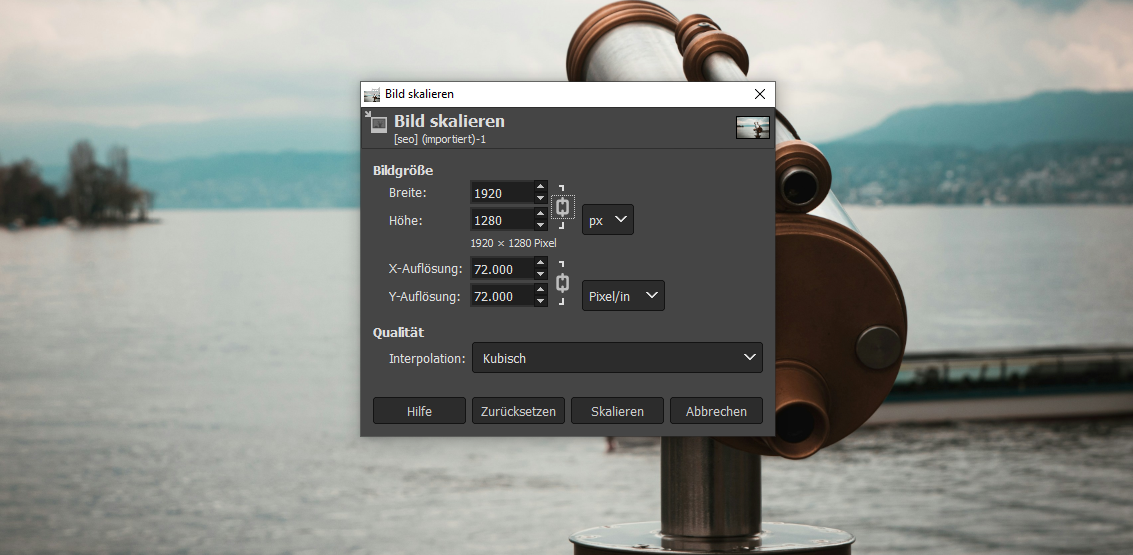
The only real difference is file size and therefore page load time. And “slow” websites significantly hurt your ranking. From a technical perspective, many sites can be improved just by resizing images with Photoshop, GIMP, or one of the many free online tools to the appropriate size (and please save them as webp or jpg files).
Even easier is optimizing your meta data. These should (also for accessibility reasons) be meaningful and follow current best practices:
- Meta title: 50–60 characters including spaces
- Meta description: 120–155 characters including spaces
- Images should have a short, descriptive alt text
- The canonical URL should match the actual URL and be descriptive
By the way, the tip that meta data must contain keywords is outdated. Google no longer takes that into account. If the keyword fits naturally into the title and/or description, though, it can help improve your click-through rate.
Finally, there’s one “technical SEO tip” that everyone can implement: after publishing, quickly check each subpage on your phone. Google now uses mobile-first indexing exclusively. That means the mobile version of your site determines how well Google rates it. If it isn’t responsive or is hard to use on a smartphone, ranking well will be difficult. It’s absolutely worth the effort to make sure your site looks good and works well on mobile.
My recommendation: Meta data should be present and follow current best practices. Images shouldn’t be larger than necessary, and your website should work well on smartphones.
SEO Tip 5: SEO shouldn’t be a shot in the dark
SEO efforts are not an end in themselves. In most cases, you have a clear goal in mind – more visitors, more leads, or more sales – and that’s why you start optimizing your website. But to properly evaluate how effective your improvements are, you need one more step: reporting and analysis.
For some subpages, you’ll see very good results after an initial round of optimization (and a bit of time for rankings to stabilize). Other pages might need 3, 4, or 5 rounds of fine-tuning. How much “Google likes” a page can also change from one day to the next. If you only optimize without ever checking performance, you’re essentially fishing in the dark.
Anyone who wants to optimize their site should use Google Analytics and Google Search Console. They give you a clear view of which pages are performing well and which might need more work. Sometimes you’ll even find pages that get decent impressions and clicks but hardly generate users who stick around. That’s why it’s worth looking at user behavior in addition to click numbers.
Maybe the search intent behind the keywords doesn’t match the page you’re using them on. Maybe the user experience needs improvements and further SEO work would be wasted effort. If you just optimize blindly without checking whether it’s paying off, you’re leaving potential on the table.
My recommendation: Use Analytics and Search Console and check what your improvements are actually achieving.
So far, so clear?
Hopefully these tips give you a solid foundation to take your first steps in optimizing your site for search engines. Please keep in mind that this is only a selection of the most important SEO tips for beginners. But if you follow them, you’ll already have taken a major step toward improving your online presence and attracting more visitors to your website.
And if you’ve realized that you might need help optimizing your site, I can help with that too. As an SEO specialist, I support clients from SMEs to large companies in unlocking the full potential of their websites.
I’d also be happy to show you which specific levers you can still adjust on your website: for new clients, I offer a free SEO audit. I analyze your site and create a list of concrete improvement suggestions that we can discuss together.
Curious? Then get in touch and tell me what goals you’d like to achieve with your website. I look forward to hearing from you!
Or would you prefer email?
I usually get back to you within the next few hours. If you'd like, you can go ahead and explain what this is about and leave me a link to your website.