
Topic: SEA basics, Google Ads targeting, Google Ads audience settings, observation & targeting audiences
Imagine you’re a tailor who sells modern made-to-measure suits. On your website, customers can book consultation appointments directly, and you get 2,000 website visitors a day. Sounds great, right? But what if those 2,000 visitors are teenagers just looking for a cheap rental suit for prom? Or 2,000 seniors who don’t care for modern cuts and cancel at the last minute?
What would be annoying in search engine optimization becomes mainly one thing in SEA (especially in Google Search Ads): expensive (PS: Here you can learn more about Google Ads costs). Each of those 2,000 clicks costs you money – and may even push out genuinely interested users because your budget is already used up. This example shows: Not every website visitor is equally valuable. Some – like the senior who takes up your time in a consultation but doesn’t buy anything – are even a loss. Time, budget and resources just evaporate.
Google also recognises this problem and offers a simple filter solution: audience targeting. Google Ads lets you precisely define who you want to reach – and who you don’t. And it works in more ways than you might think.
Audience settings in Google Ads
Even when creating a campaign, you can narrow down the recipients of your ads. This includes:
- Location: You can include or exclude specific regions or places.
- Language: Choose which languages your target audience speaks.
- Audience segments: From “Parents of toddlers” to “Fans of high-end computers” to people searching for accounting software.
At this stage, you also select whether you want to use these audience segments for targeting or observation: The “Targeting” option, also called audience targeting, means that only people whom Google places in the selected segment will see the ad. The “Observation” option, also called observation audiences, on the other hand, does not restrict delivery but shows you statistics about the audiences for campaign optimisation and allows bid adjustments. For example: “For renters I want to spend 50% less ad budget than for comparable homeowners.” You can read more about audience segments here.
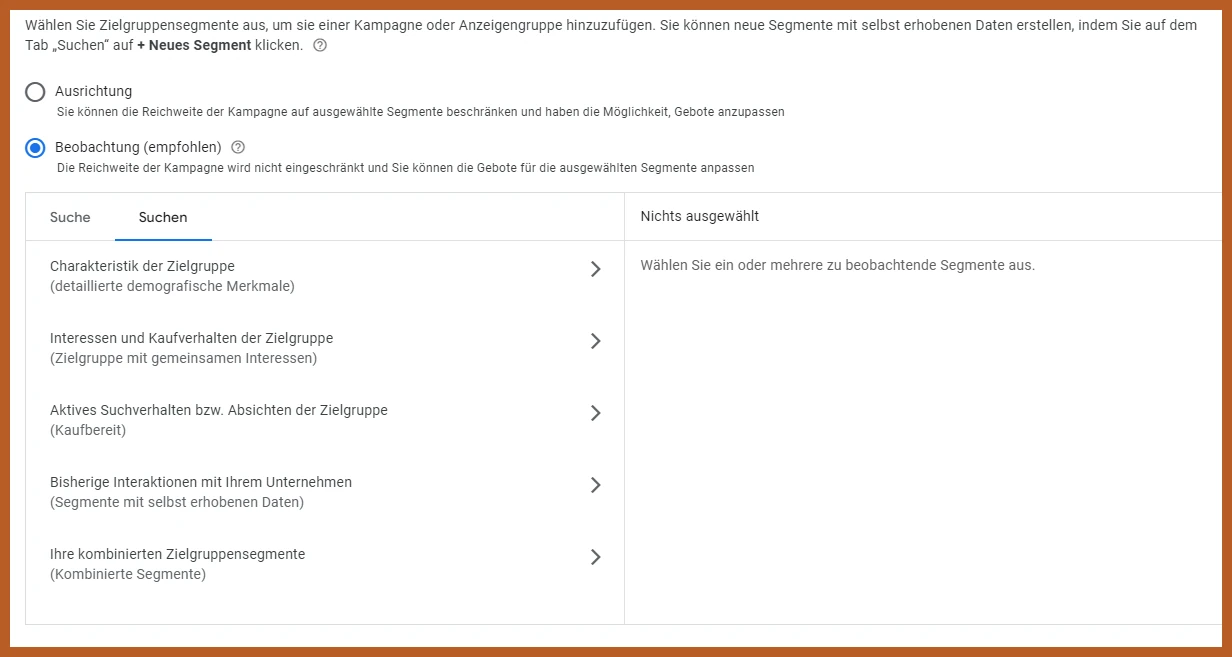
Own screenshot
In addition, you can explicitly exclude individual segments, even if your campaign only uses observation audiences.
Tip: I’ve found that the “Targeting” option drives click prices up massively. You also lose potential users whom Google (yet) can’t clearly assign to the right audience. That’s why I now prefer to use observation audiences with strong bid adjustments.
Finding the right demographics
So far, so good. Place of residence/work and language alone, however, don’t provide real narrowing. “German-speaking users in the canton of Zurich” is far too broad, and even with a bid adjustment for “Fans of high-end computers” we don’t get much further here: anyone from an 18-year-old gamer to a 50-year-old head of IT could be meant. This is where demographic settings come into play.
Google gives you plenty of control to exclude specific demographics entirely, adjust bids, and refine your audience analysis. These options are available to you in Switzerland:
- Gender: Female, Male, Unknown.
- Age: 18–24, 25–34, 35–44, 45–54, 55–64, 65+
Be careful with exclusions
For some products, it makes sense to make small adjustments right from the start. You probably already know your target audience and have a rough idea of what your persona looks like. For maternity wear, for example, it might make sense to exclude men or drastically reduce bids for them. The age group “18 to 24” is also rarely targeted when advertising home renovations.
But of course, there are always exceptions: A man might research maternity wear for his pregnant partner, and an 18-year-old might be looking up renovation topics for parents who aren’t very internet-savvy. At first glance, you also wouldn’t expect an 18- to 24-year-old to search for venues for a large corporate event, yet that’s exactly what happens at large companies with relatively young event management teams.

Own screenshots
Tip: Approach your campaign with an open mind. Analyse the statistics regularly before making exclusions. Think early on about who might be decision-makers or influencers for your product, but only optimise once you have clear data.
Tailor, stick to your target audience
Back to our initial example: How would the tailor set up his campaign optimally? First, he would think about the key characteristics of his target audience – such as age, gender, place of residence, and interests/characteristics. He could, for example, exclude or heavily reduce bids for age groups under 25 and over 65, as they are less likely to be interested in made-to-measure suits.
He could also exclude women altogether or at least greatly reduce bids for them. In this specific case, however, I wouldn’t recommend that and would set an initial bid adjustment of a maximum of -20% for women: Who knows how often a partner gives a man a made-to-measure suit for his birthday? However, if after a month it turns out that only 5% of bookings come from women, you can still adjust the audience.
At the same time, our tailor could work with observation audiences to analyse the performance of different segments and adjust his bids accordingly. In this case, I would, for example, add “Business professionals”, “Luxury shoppers”, and “In-market for suits, costumes, and business clothing”. But “Works in: Finance sector” or “Job seekers: executive and management roles” would also be interesting, as it may turn out that many private bankers and people who see an important job interview on the horizon are looking for made-to-measure suits.
Target audience perfect? Not even close
This is only the beginning. The right targeting is not just about the specific audience settings – even outside of these options, you can use simple methods to optimise your visitors, costs, and conversions very precisely. If you’re curious how that works, read my follow-up article on “Targeting in Google Ads”.
Or would you prefer email?
I usually get back to you within the next few hours. If you'd like, you can go ahead and explain what this is about and leave me a link to your website.